


Solutions
For Exporters & Importers

For Freight Forwarders and Logistics Service Providers
Shipment Tracking Software: Features, Benefits, and How to Choose


6 Minutes
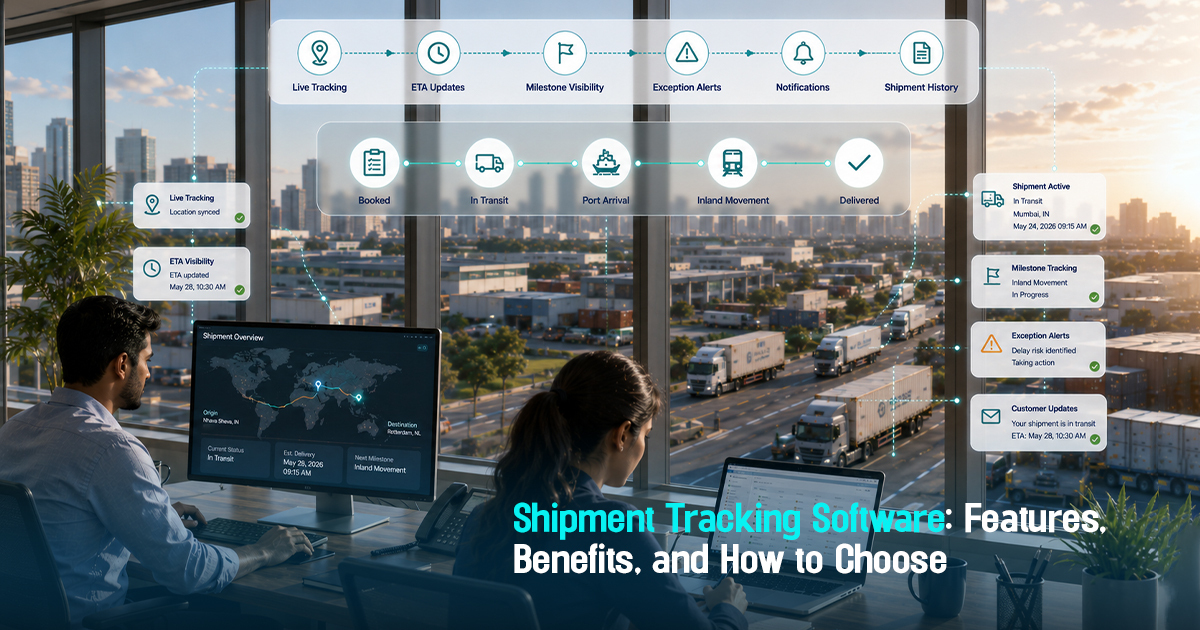
Shipment tracking software is a logistics solution that enables freight teams to track shipments in real time, monitor milestones, handle exceptions, and communicate accurate updates. This operational visibility is critical for reducing delays, managing risks like detention and demurrage, and improving coordination across carriers and vendors. Without structured shipment tracking software, freight operations can suffer from visibility gaps that lead to reactive follow-ups, poor customer communication, and missed delivery targets. This article provides a detailed, practical guide to the features, benefits, and selection criteria for shipment tracking software, helping logistics teams gain centralized control and operational clarity.
What Is Shipment Tracking Software and Why It Matters
Shipment tracking software centralizes real-time updates of shipment locations, milestones, estimated times of arrival (ETA), and exceptions across carriers. It differs from basic shipment tracking by aggregating data from multiple sources into a single platform, enabling proactive operational decisions.
Operationally, this means logistics teams can monitor many shipments simultaneously, assign owners for exceptions, communicate timely updates to customers, and reduce costly delays like demurrage. Missing ETD or ETA changes centrally often leads to costly follow-ups and customer escalations, which structured shipment tracking software helps prevent.

A Practical Shipment Tracking Software Workflow Framework
Effective shipment tracking software follows a workflow with these key operational steps:
Booking confirmation feeds into centralized tracking where milestone updates from carriers and ports are aggregated. Next, ETA/ETD monitoring highlights any shipment delays, triggering exception handling workflows. Assigned owners then coordinate with carriers and vendors to resolve issues, while customer communication ensures transparency. Finally, completed shipment milestones and documents are validated for operational auditability.
This framework ensures logistics teams reduce manual follow-ups and fragmented data sources. For example, when a carrier reports a sailing delay, the system flags the exception immediately, assigns an owner, and triggers customer alerts before escalation. This operational clarity reduces detention risks by enabling timely decisions.
Key Features to Look for in Shipment Tracking Software
Shipment tracking software must include: real-time location updates, milestone tracking, ETA/ETD alerts, exception management, documentation control, centralized dashboard, multi-carrier integration, customer update modules, and audit-ready data trails.
For example, multi-carrier integration allows operations teams to track ocean, air, and land shipments all in one place, removing the inefficiency of monitoring separate carrier portals. Exception management features enable teams to assign distinct owners for each shipment delay, avoiding ownership confusion and ensuring rapid resolution.
Role-Wise Guidance for Using Shipment Tracking Software Effectively
Freight forwarders should focus on coordinating timely carrier updates, flagging exceptions promptly, and consolidating shipment data for customer visibility.
Importers and exporters need to monitor ETD and ETA changes, verify documentation handoffs, and proactively communicate with customers to manage expectations and reduce escalations.
Operations teams must track milestone completions daily, manage exception ownership, and ensure documentation is validated ahead of customs checkpoints to avoid clearance delays.
Procurement and documentation teams should ensure shipment tracking data is linked with freight procurement records, validating that booked vendors meet delivery timelines and documentation compliance standards.
Before, During, and After Shipment: Implementation Breakdown
Before shipment: Confirm bookings in the tracking system, verify vendor integrations, and prepare expected milestone schedules and ETAs.
During shipment: Monitor carrier milestones, track ETAs in real time, assign exception owners for any delays, and maintain customer communication with updated ETAs and exception resolutions.
After shipment: Ensure all delivery milestones are closed properly, handle any final exceptions such as demurrage charges, validate documentation for customs release, and review vendor performance against shipment timelines for future procurement decisions.
Centralized shipment tracking transforms freight operations by giving clear ownership, real-time visibility, and actionable exception alerts.
Practical checklist
Use this checklist to evaluate or improve shipment tracking software usage in your operations:
- Are ETD and ETA changes monitored centrally and updated in real time?
- Is there a clear assignment of owners for all shipment exceptions?
- Does the system integrate with multiple carriers and consolidate data?
- Are shipment milestones tracked and closed systematically?
- Is customer communication automated for status updates and exceptions?
- Are document handoffs and customs checkpoints tracked within the system?
- Does the software provide audit trails for shipment events and decisions?
- Is exception handling prioritized over routine updates to reduce noise?
- Are detention and demurrage risks visible and actively monitored?
- Does the system support linking tracking data with procurement and vendor performance reviews?
Common mistakes
Logistics teams often make these mistakes with shipment tracking software:
- Relying on manual carrier portal checks: This results in delayed updates causing shipment disruptions. Fix: Use software with multi-carrier integration to automate data collection.
- Failing to assign exception owners: Leads to unresolved delays and poor customer communication. Fix: Implement clear ownership rules within the tracking system.
- Ignoring documentation milestones: Causes customs clearance delays and detention risk. Fix: Track documentation status alongside shipment milestones for proactive handoffs.
- Overloading teams with non-critical updates: Important exceptions get buried in routine data. Fix: Use exception-first alerts prioritizing delays over normal milestones.
- Separating tracking from procurement data: Results in weak vendor performance assessment. Fix: Integrate shipment tracking with procurement records for holistic control.

Frayto-Aligned Shipment Tracking Workflow
Frayto's approach to shipment tracking software emphasizes centralized tracking visibility, where booking confirmation updates the system, carrier milestones are tracked in real time, ETD and ETA alerts trigger exception workflows, owners coordinate carrier follow-ups, customers receive timely updates, and milestone completion is audited.
This disciplined, exception-first workflow reduces operational friction by ensuring data accuracy, ownership clarity, and reduced manual follow-ups. For example, the system flags a container delay at a transshipment point, automatically escalates to the responsible agent, and triggers customer alerts well before potential demurrage accrues.
Concrete Freight Operations Examples
Example 1: A freight forwarder used shipment tracking software to centralize data across four carriers handling a multimodal shipment. Real-time milestones exposed a 48-hour delay at port due to documentation mismatches. Early exception alerts enabled the team to coordinate immediate corrections, preventing demurrage costs.
Example 2: An importer faced customer escalations from lacking ETA updates during a transshipment delay. Implementing shipment visibility tools with ETA monitoring and automated customer notifications eliminated these escalations by setting clear expectations ahead of arrival.
Example 3: A logistics head integrated freight procurement with real-time shipment tracking software to validate vendor performance. This revealed frequent vessel delays by a particular carrier, informing future procurement decisions and avoiding costly repeat delays.
How to Choose the Right Shipment Tracking Software
Assess your operational needs: Determine the volume of shipments, number of carriers, and required integration points. Choose software that supports your specific trade lanes and modes.
Prioritize features that enhance visibility: Look for real-time tracking, milestone updates, ETA/ETD alerts, exception management, and documentation workflow capabilities. Avoid solutions that offer only basic shipment status without operational control.
Evaluate user experience and onboarding: Select platforms that your team can adopt quickly with support for role-based access, clear dashboards, and easy communication modules to reduce manual emails and calls.
Check integration and scalability: Your software should integrate with existing freight procurement, documentation, and vendor management tools. A scalable platform supports growth without complex switching.
Validate auditability and reporting: The platform must provide comprehensive data logs for milestone events, exception handling, and customer communications to support operational reviews and external audits.
Make decisions based on reducing manual follow-ups, risk mitigation (like detention and demurrage), improving customer transparency, and supporting your operational workflows consistently.
Get in Touch!
We'll reach out shortly with the info you need. No spam, just a helpful conversation.
Recommended Blogs


Freightstory Technologies Private Limited
A-209, Dynasty Business Park, JB Nagar,
Andheri East, Mumbai- 400059, India


For Exporters & Importers
For Freight Forwarders
© 2026 Frayto. All Rights Reserved.