


Solutions
For Exporters & Importers

For Freight Forwarders and Logistics Service Providers
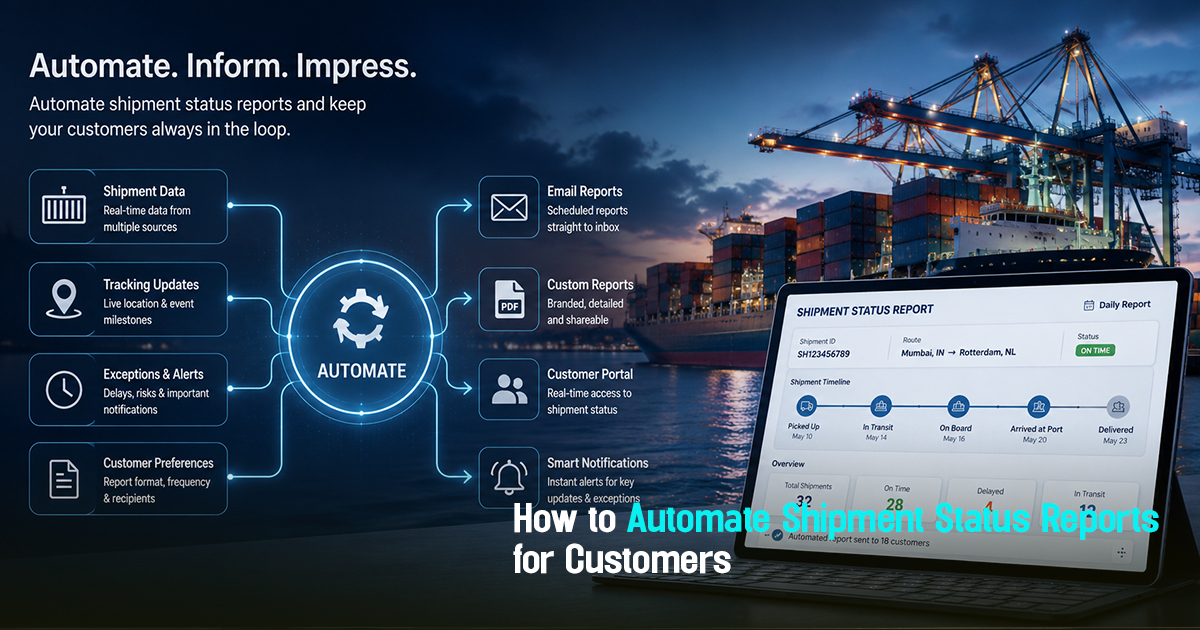
How to Automate Shipment Status Reports for Customers


7 Minutes
Automate shipment status reports means setting up structured, real-time processes that deliver consistent and accurate freight updates to customers without manual intervention. Operationally, this matters because manual reporting delays create visibility gaps, increase customer queries, and escalate exception handling. Freight forwarders and logistics teams often struggle with fragmented carrier data and ad hoc communication workflows. This article provides practical guidance on automating shipment status reports to maintain transparency, reduce follow-ups, and improve customer trust with centralized shipment visibility.
What Does It Mean to Automate Shipment Status Reports?
Automating shipment status reports involves creating systems that extract real-time freight movement data, apply update logic, and deliver tailored reports or notifications to customers without manual input. This ensures consistent communication based on shipment milestones and exceptions. The goal is to align operational updates with customer expectations and reduce errors linked to delayed or inconsistent status reporting.
In practice, automation integrates shipment tracking data (such as ETD, ETA, carrier milestones) with communication tools, enabling real-time alerts and comprehensive status summaries. This structured approach enhances visibility, enables proactive exception handling, and frees up operations teams from repetitive status updates.

A Practical Workflow Framework for Automating Shipment Status Reports
Automating shipment status reports requires a well-defined workflow that coordinates tracking, exception detection, and customer communication. Here is a 6-step framework that freight teams can adopt:
1. Integrate Carrier Tracking Data: Collect data from multiple carriers through APIs or centralized shipment visibility platforms to ensure real-time milestone updates.
2. Define Milestone Triggers: Identify key shipment events like container loading, departure, transshipment, customs clearance, and delivery for automatic report generation.
3. Configure Exception Detection: Program alert rules for delays, missed milestones, ETA changes, or documentation issues to flag exceptions early.
4. Customize Customer Communication Templates: Setup standardized but customizable status report templates aligned to customer preferences and shipment types.
5. Automate Scheduled and Event-Driven Reports: Schedule regular status summaries and trigger immediate alerts for exceptions directly to customers via email, SMS, or portals.
6. Capture Feedback and Update Workflow: Monitor report effectiveness and customer feedback to tweak milestone definitions or communication formats.
This framework ensures freight teams transition from reactive updates to proactive, consistent customer engagement, reducing manual effort while closing visibility gaps.
Role-Wise Guidelines for Automating Shipment Status Reports
Freight forwarders must focus on consolidating carrier data and defining milestone triggers for exceptions. They need to ensure all active shipments are connected to the automation layer and that manual follow-ups are minimized.
Importers and exporters benefit from receiving timely, standardized shipment updates that anticipate customs clearance and delivery timelines. They should communicate expected update frequency and preferred communication channels to freight partners.
Operations teams are responsible for monitoring the automated reporting system’s health, reviewing flagged exceptions promptly, and coordinating with carriers on missed milestones.
Procurement and documentation teams must collaborate to ensure shipment status reports include any critical documentation handoff alerts, such as Bill of Lading or customs clearance statuses, enabling timely document follow-ups.
Stage-Wise Breakdown to Implement Shipment Status Automation
Implementing shipment status report automation involves three key stages:
Before Shipment Departure: Setup tracking integrations with carriers, define customer profiles and reporting needs, and configure milestone triggers.
During Transit: Monitor live shipment data, automatically iterate reports at scheduled intervals and on exceptions, prioritize shipment communications based on risk or ETA changes.
At Delivery and After: Automate final delivery confirmation reports and feedback surveys; collect post-shipment performance data for continuous improvement.
Operational clarity through these stages ensures customers are never left wondering about shipment status while reducing repetitive manual status update tasks.
Automated shipment updates shift teams from reactive firefighting to proactive control and clear customer communication.
Practical Checklist for Shipment Status Report Automation
To launch or improve shipment status report automation, verify these key checks:
1. Are all carrier tracking APIs or portals integrated into a unified platform?
2. Are shipment milestones clearly defined and matched to operational events?
3. Are exception rules configured for common delay types and document handoff failures?
4. Are customer update templates standardized but adaptable to different shipment or client needs?
5. Are both scheduled and event-driven notifications automated?
6. Is there a feedback mechanism to capture customer satisfaction on report accuracy and timeliness?
7. Are operational teams alerted for shipment exceptions before automated customer updates go out?
8. Is auditability maintained for all reports and communications for compliance and performance reviews?
9. Are integration and reporting errors flagged and resolved promptly?
10. Are customer communication preferences (frequency, channels) recorded and respected?
Common Mistakes in Automating Shipment Status Reports
Mistake 1: Incomplete Carrier Data Integration
Many teams rely on manual carrier portal checks, leading to missed updates. This delays report accuracy and creates trust gaps. Fix: Use APIs or centralized shipment visibility platforms that aggregate carrier data automatically.
Mistake 2: Overloading Customers with Irrelevant Updates
Too frequent or unfiltered notifications frustrate clients and cause them to ignore important alerts. Operational noise reduces communication effectiveness. Fix: Define clear milestone-triggered and exception-only notifications tailored to customer preferences.
Mistake 3: No Exception-First Workflow
Automation without priority exception handling leads to reactive operations and late customer escalations. Visibility gaps increase friction. Fix: Implement exception detection rules to flag delayed or at-risk shipments before customer notification.
Mistake 4: Lack of Documentation Status in Reports
Customer shipment updates that ignore critical document handoffs (e.g., B/L availability) cause frustration during customs and delivery. Missing audit trails compound delays. Fix: Integrate document milestone tracking into report automation workflows.
Mistake 5: Manual Overrides Without Tracking
Manual status message edits done outside the system lead to audit gaps and inconsistent information. Accountability suffers. Fix: Maintain all communication and editing within the automated system with logs for auditability.

Frayto-Aligned Workflow for Automated Shipment Status Reports
A practical workflow aligning with Frayto principles to automate shipment status reports includes:
1. Centralized Carrier Data Collection: Connect all ocean, air, and land carriers into a single visibility platform.
2. Milestone and Exception Identification: Define key shipment stages like loading, departure, customs clearance, and delivery, plus exception triggers.
3. Automated Exception-First Notifications: Dispatch alerts internally first for resolution before automated customer communication.
4. Customer Communication Management: Use structured templates with delivery preferences and dynamic content based on shipment data.
5. Documentation Workflow Integration: Link document validation and customs checkpoints to shipment status reporting to flag documentation delays quickly.
6. Continuous Feedback Loop: Collect customer responses and operational team inputs to refine reporting cadence and milestone relevance.
This workflow significantly improves operational clarity and reduces manual intervention, enabling logistics teams to focus on exceptions and exceptions closure.
Real-World Freight Operations Examples of Shipment Status Automation
Example 1: A freight forwarder integrates multiple ocean carrier APIs into a visibility platform. When a container is delayed in transshipment, an automated exception alert is generated first to operations, then a customer-friendly report is sent immediately, preventing escalation.
Example 2: An importer receives daily automated status summaries on their shipments’ ETAs and customs documentation availability, reducing call volumes by 40% and improving exception response times.
Example 3: A logistics operations team uses an automated communications system that flags missing Bill of Lading documents before vessel arrival, triggering corrective actions and avoiding demurrage risks.
How to Manage Key Components: Shipment Tracking Automation, Customer Communication, and Exception Handling
Shipment Tracking Automation: Connect with carrier systems directly through APIs or standardized event messages to ensure real-time visibility. Automate ETD/ETA monitoring, and sync milestones consistently.
Customer Communication: Automate updates with dynamic templates that accommodate varying shipment types and customer preferences. Include relevant milestones, documentation status, and clear exception explanations.
Exception Handling: Configure parameters to flag delays, document gaps, or unusual carrier updates. Assign ownership for investigation, delay mitigation, and controlled customer notification timing.
Comparison Insight: Automated Shipment Status Reporting vs Manual Reporting
Manual shipment status reporting often suffers from data inconsistency, latency, and reliance on individual effort, which can cause customer dissatisfaction and operational chaos. Automated reporting centralizes data, standardizes communication, and triggers exception-first workflows, improving visibility and reducing follow-up overhead. This shift moves teams from reactive firefighting to proactive control.
Automation frees teams to focus on resolving exceptions and improving shipment outcomes rather than sending repetitive updates.
Conclusion
Automating shipment status reports is essential for contemporary freight operations aiming to maintain operational clarity and build sustained customer trust. A structured approach that integrates carrier data, prioritizes exceptions, and standardizes customer communication reduces manual workload and visibility gaps. Teams gain the advantage of timely milestone tracking, proactive issue resolution, and audit readiness. As globalization and regulatory complexities grow, relying on manual shipment reporting becomes unsustainable. Adopting automated, exception-first shipment status reporting workflows lets freight forwarders, importers, exporters, and operations teams stay ahead by focusing on exceptions, documentation discipline, and centralized control while keeping customers informed without delays. The operational takeaway for logistics teams is clear: investing in shipment tracking automation and consistent customer updates is no longer optional, but a critical enabler for both efficiency and service excellence.
Get in Touch!
We'll reach out shortly with the info you need. No spam, just a helpful conversation.

Freightstory Technologies Private Limited
A-209, Dynasty Business Park, JB Nagar,
Andheri East, Mumbai- 400059, India


For Exporters & Importers
For Freight Forwarders
© 2026 Frayto. All Rights Reserved.