


Solutions
For Exporters & Importers

For Freight Forwarders and Logistics Service Providers
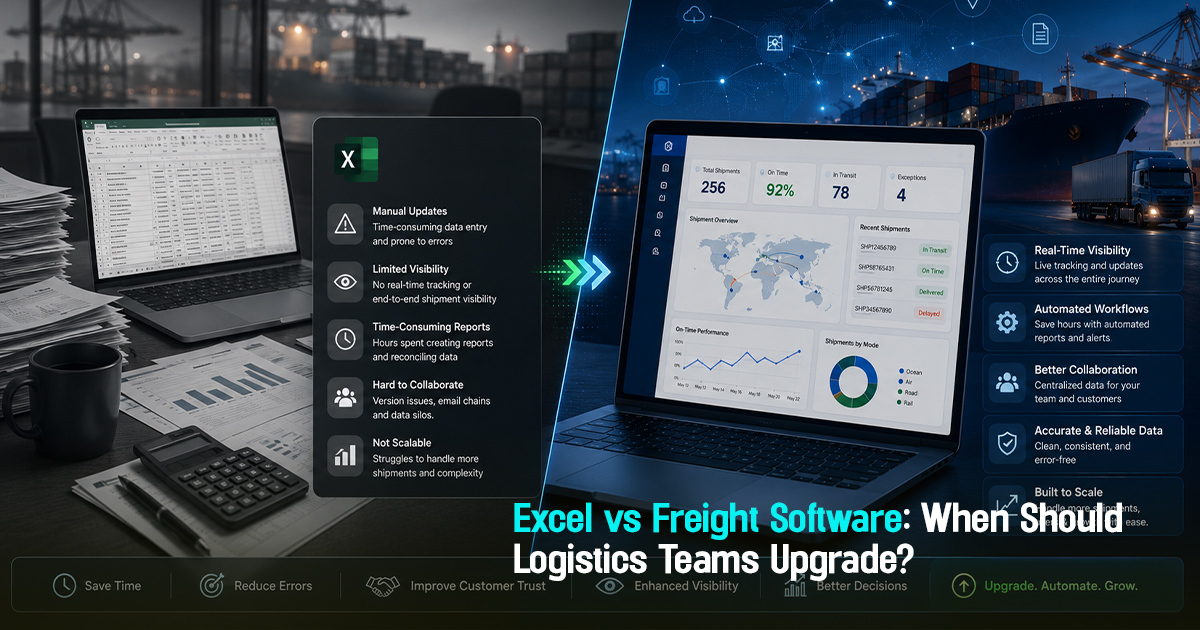
Freight Software vs Excel: When Should Logistics Teams Upgrade?


6 Minutes
The debate of freight software vs Excel centers on when logistics teams should transition from manual spreadsheets to specialized digital tools for managing freight operations. Excel is often the default tool relied upon for shipment tracking, rate comparisons, and vendor coordination. However, as freight volume and complexity grow, Excel's limitations in visibility, exception handling, and operational control become evident. This article explores when upgrading to dedicated freight software is essential to unlock structured workflows, centralized tracking, and better decision-making for freight forwarders, importers, exporters, and logistics teams.
What is the Difference Between Freight Software and Excel in Logistics?
Freight software comprises purpose-built digital platforms designed to manage freight procurement, shipment visibility, carrier coordination, documentation, and operational control in a centralized environment. Excel is a generic spreadsheet tool, widely used for data entry and basic analysis but lacking built-in freight-specific workflows or integration capabilities.
Operationally, freight software offers real-time tracking, exception management, automated alerts, and auditability, which Excel cannot deliver without complex manual effort. This often leads to visibility gaps, delayed exception handling, and increased risk of errors when managing shipments purely through Excel.

A Practical Freight Workflow Framework: From Excel to Freight Software
Migrating from Excel to freight software follows a structured workflow to improve operational clarity. The steps are:
- Data Consolidation: Gather shipment, vendor, and rate data scattered across spreadsheets into a centralized database.
- Rate Request and Vendor Comparison: Use software workflows to standardize quote collection and compare on consistent terms, minimizing manual errors common in Excel.
- Booking and Documentation Control: Automate carrier bookings and document handoffs, ensuring no critical documents are missed before customs checkpoints.
- Shipment Visibility and Milestone Tracking: Centralize real-time ETD/ETA monitoring, carrier milestones, and exception alerts to replace manual spreadsheet tracking.
- Exception Handling and Customer Communication: Assign ownership for exceptions and automate timely updates to customers, reducing escalations and follow-ups.
- Audit and Performance Review: Capture approval workflows and shipment history in an auditable system for cost control and vendor performance assessment.
This framework represents a practical upgrade path that sustains freight execution quality, operational discipline, and cost efficiency beyond Excel’s manual limits.
When Does Excel Fall Short: Key Limitations in Logistics Operations
Excel limitations in logistics become apparent as teams scale volume and complexity beyond basic data tracking. Common issues include error-prone manual data entry, lack of real-time shipment visibility, no central exception ownership, and inconsistent documentation workflows.
For example, an importer tracking shipments across multiple carriers in Excel might miss ETD changes leading to customs delays and demurrage charges. Similarly, procurement teams comparing rates without automated accessorial charge checks risk hidden costs slipping through. Excel cannot natively synchronize data from carrier portals or generate proactive customer updates, causing reactive fire-fighting instead of proactive management.
Role-Wise Guidance: Managing the Transition from Excel to Freight Software
Freight forwarders should focus on consolidating shipment data into one platform to eliminate frequent manual carrier portal checks and WhatsApp follow-ups.
Importers and exporters need centralized visibility of shipment milestones, document status, and ETA changes rather than juggling multiple Excel trackers or email threads.
Operations teams benefit from automation of milestone tracking, exception signalling, and customer communications to reduce manual overhead.
Procurement and documentation teams should implement structured vendor comparison, rate validation, and controlled approval workflows to prevent cost leakage and audit gaps.
This collective shift supports freight teams in improving operational clarity and reducing repetitive manual effort that hinders scale.
A Before-During-After Shipment Process Breakdown for Upgrading Logistics Operations
Before Shipment: Transitioning teams validate rates, confirm vendor reliability, and prepare documentation in a centralized system instead of fragmented Excel files.
During Shipment: Use freight software to track milestones, monitor ETA/ETD changes in real time, and manage exceptions with ownership assignment and automated alerts.
After Shipment: Analyze delivery performance, document handoff completion, and audit freight cost versus quotes to drive continuous process improvement.
This stage-wise approach ensures teams manage data and decision points proactively rather than reactively relying on manual Excel updates.
Practical checklist
To evaluate whether your logistics team should upgrade from Excel to freight software, use this checklist:
- Are shipment ETD/ETA and milestone updates managed in real time or manually updated?
- Is there a centralized record of vendor quotes with consistent comparison metrics (e.g., accessorial charges)?
- Do exceptions have clear ownership with automated alerts to the responsible person?
- Are customer updates automated based on shipment status or manually prepared?
- Is there visibility into documentation completion and customs checkpoints avoiding last-minute delays?
- Can procurement approvals and bookings be audited easily in your current system?
- Is multi-carrier tracking consolidated in one platform or scattered across portals and spreadsheets?
- Are frequent manual carrier follow-ups or internal escalations required?
- Is data entry prone to errors and inconsistencies due to manual spreadsheet handling?
- Is it difficult to generate actionable reports on shipment performance and cost variance?
Affirmative answers to several points above signal a strong case for upgrading to freight software.
Common mistakes
1. Relying on Excel as the single source of truth: This leads to version control issues and fragmented communication. Fix: Introduce a centralized freight management platform with role-based access and real-time updates.
2. Manual milestone tracking causes delayed exception handling: Missing ETD changes in Excel can trigger detention charges. Fix: Switch to automated tracking with alert workflows to react faster.
3. Lack of structured procurement workflows: Approval without quote validation invites cost leakage. Fix: Use freight software workflows that enforce rate comparison, accessorial checks, and approval logging.
4. Inadequate documentation management: Relying on Excel rows causes missed custom checkpoints and shipment delays. Fix: Implement digital document control with exception alerts before shipment arrival.
5. Poor customer communication coordination: Manually compiled updates delay critical information sharing. Fix: Automate customer notifications linked to shipment milestones and exceptions.
Addressing these mistakes through structured processes helps logistics teams move from chaos to control effectively.

Frayto-Aligned Workflow Example: Freight Procurement to Shipment Visibility
A typical Frayto-aligned process begins with Rate Request where procurement teams request standardized quotes. This is followed by Vendor Comparison using normalized data to evaluate rates and transit times. Once approved, the Booking step confirms carrier commitment. During shipment, centralized Tracking captures key milestones and ETAs. Any exceptions trigger immediate Exception Closure workflows to assign owners and notify stakeholders.
This end-to-end workflow ensures visibility, control, and auditability at every stage, overcoming the typical Excel-driven pitfalls of lost data and reactive management.
Practical examples from freight operations
Example 1: A freight forwarder using multiple Excel sheets missed a sail delay notification, causing late customer alerts and costly demurrage. Upgrading to software enabled automated ETD/ETA updates and reduced demurrage exposure.
Example 2: An importer manually tracked vendor quotes in Excel, resulting in approval without accessorial charges review. This led to unexpected charges. Freight management software would have flagged cost mismatches before booking.
Example 3: An operations team struggled with document handoff delays causing customs clearance issues. Software-based documentation workflows with checklist enforcement resolved these delays by alerting document owners ahead of shipment arrival.
Why freight software offers operational efficiency beyond Excel
Logistics software benefits go well beyond digitizing data entry. They enable process automation, real-time shipment visibility, exception-first handling, and coordinated communication workflows. Excel cannot natively track changing ETAs across multiple carriers or assign ownership for delayed shipments. Freight software consolidates all relevant data, automates alerts, and provides dashboards to monitor exceptions before they escalate.
This improves operational control and risk mitigation, allowing teams to reduce manual follow-ups, avoid detention and demurrage, and strengthen customer trust with timely updates in an auditable environment.
FAQ
Get in Touch!
We'll reach out shortly with the info you need. No spam, just a helpful conversation.
Recommended Blogs
Freightstory Technologies Private Limited
A-209, Dynasty Business Park, JB Nagar,
Andheri East, Mumbai- 400059, India


For Exporters & Importers
For Freight Forwarders
© 2026 Frayto. All Rights Reserved.